Most people will never master AI for one simple reason. They treat it like a tool to try, not a skill to build.
So they collect apps, save prompts, read threads, and still end up doing the work the slow way.
If you are serious about how to master AI, the play is different. You pick a few high-leverage skills, and you practice them until they become automatic.
That is what this piece is. A practical 7 skill playbook you can actually use in 2026 without turning your life into a permanent AI experiment.
Next up, I will show you the one idea that connects all seven skills, and it will make the whole list feel way easier to execute.
The One Idea that Makes All Seven Skills Work

Here is the thread that connects everything.
Depth beats breadth.
Most people try to keep up with AI by touching ten tools lightly. That feels productive, but it builds nothing. Mastery comes from doing the same few things on repeat until you can get great output on demand. This is where AI productivity habits quietly beat hype.
So the goal is not to know everything.
It is to build a small loop that compounds.
- One source of AI news you actually act on
- One tool you commit to
- One way to set context before you prompt
- One way to talk to AI like a teammate
- One way to ship before perfect
- One way to keep strategy in your hands
That is how to master AI without getting overwhelmed.
The first skill is simple and a little brutal. Stop following AI news accounts that never teach you anything.
Skill 1: Stay Updated With AI News Without Doomscrolling
Being informed is useful. Being flooded is not.
The mistake most people make is treating AI news like a feed you scroll. It should be a tiny input that turns into an output.
Here is a simple filter I use.
Follow only sources that do one of these:
- Show real examples
- Explain tradeoffs
- Teach a workflow
- Give you something you can try today
Everything else is entertainment.
A good rule is one read, one action. If you read something about AI, you have to apply it once the same day. Even if it is small.
Here are a few examples of actions that take five minutes:
- Test one new prompt on a real task
- Rewrite one paragraph using a new constraint
- Try one feature you have ignored
- Save one reusable template in your AI Files folder
That is how you stay updated with AI news without turning your brain into a notification center.
Next up, the 30-day move that makes everything easier. Pick one tool and stop hopping.
Skill 2: Pick One AI Tool and Master It
Trying a new AI tool feels productive. New buttons. New features. New hope.
But a lot of the time, it is just a sneaky way to delay the real work. You end up learning interfaces instead of building output.
If you want to learn how to master AI, commit to one tool for 30 days. Not forever. Long enough to build instincts.
Because the real gains come when you stop thinking about where things are in the menu and start thinking in workflows.
Here is what to do in week one.
- Learn how it handles long context
- Learn how it handles files
- Learn how it searches or references sources
- Learn how to save your best prompts and reuse them
Then keep a tiny log of wins. One line per day.
- Drafted a tricky email
- Turned notes into actions
- Wrote a plan that actually made my week calmer
- Fixed tone without losing the point
That daily repetition is what makes “pick one AI tool and master it” real. You are building muscle memory, not collecting tools.
Now we get to the part most people skip. The setup that makes your prompts work better before you even write them.
Skill 3: Set Up Your AI Before You Prompt
Most people open an AI tool and start typing like it is Google.
Then they blame the tool when the output is generic.
The fix is simple. Give it context before you ask for anything.
Think of it like onboarding a new teammate. If you give them zero background, you get a safe, vague answer. If you give them the basics, you get something useful.
Here is an easy setup that takes 15 minutes once and saves you hours later.
Create an AI Files Folder
This is where you store reusable context. The stuff you usually repeat every time.
Start with three files.
1) Me
Your role, your tone, what you do, and what you do not do.
2) Audience
Who you write for, what they care about, what they hate, what makes them say yes.
3) Examples I like
Paste 3 to 5 samples of writing you love. Your own is best. If not, use anything that matches your voice.
This is the foundation for AI files and reusable context. It is not fancy. It is just smart.
Define Success Before You Ask
Before you write a prompt, add two lines.
- What does good look like
- What should be avoided
That tiny step upgrades your AI prompt skills instantly.
Next, we teach AI your expertise so it stops guessing and starts sounding like it actually knows your world.
Skill 4: Teach AI Your Expertise So It Stops Guessing
Here’s a funny truth. AI is not “smart” about your world. It is smart about patterns.
So if you do not teach it how you think, it fills the gaps with generic internet filler. That is when the output starts sounding like a clean but empty template.
The fix is to let it interview you once, then save the answers.
Do a 10-minute Expertise Download
Open your tool and paste this.
Prompt
Interview me so you can write and think like my assistant. Ask me 10 questions.
Focus on my standards, constraints, and decision rules.
After I answer, I summarize my answers into a one-page playbook I can reuse.
Good questions to extract:
- What you care about most
- What you always avoid
- What a great outcome looks like
- What mistakes do you keep seeing
- What tradeoffs do you make and why
This is the fastest way to teach AI your expertise without writing a long manual.
Turn it Into Something Reusable
Once you get the playbook, save it in your AI Files folder as something like, “My Rules and Standards.”
Now, every time you write AI prompts, you can paste that file once and stop repeating yourself.
And when the AI gets something wrong, you do not argue. You update the playbook.
That is how the quality compounds.
Next up, we talk to AI like a colleague instead of treating it like a vending machine, and your results get way sharper.
Skill 5: Talk to AI Like a Colleague, Not a Vending Machine
Most people use AI like this.
They toss in a vague request. They hope the output is good. They get something generic. They feel disappointed.
A better way is to treat it like a smart teammate you still need to manage.
Here is the simple shift.
Do not start with writing.
Start by asking.
Start with Questions First
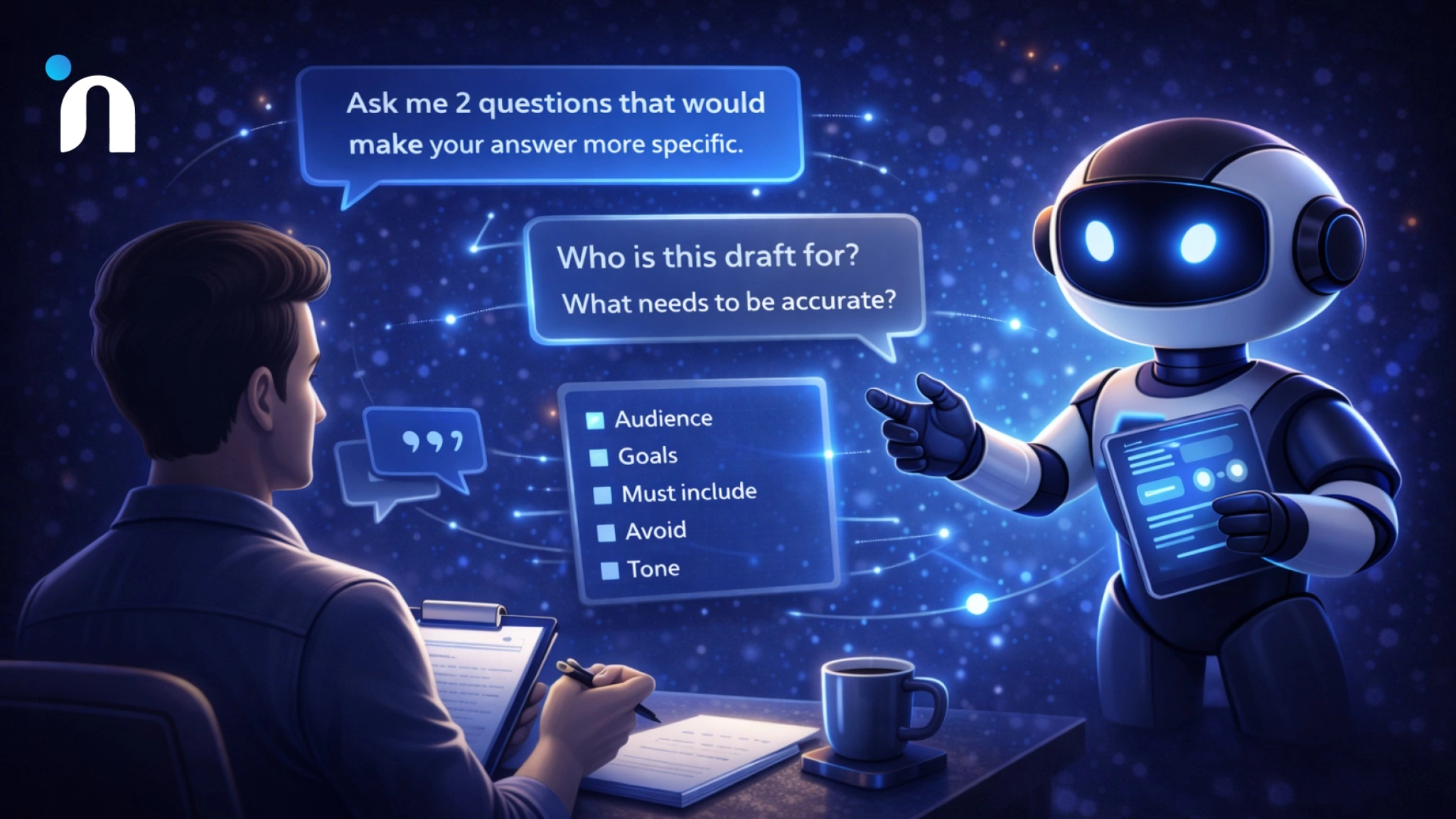
Before you let it produce anything, say:
Ask me 2 questions that would make your answer more specific.
This single line upgrades your output more than most fancy prompt tricks.
Give Direction Like You Would to a Teammate
Tell it what success looks like.
- Who this is for
- What it needs to achieve
- What must be included
- What should be avoided
- What tone do you want
This is where AI workflow setup quietly makes everything better. You are setting the brief before the draft. If your drafts still sound generic, here is a simple way to remove AI tone that makes your writing feel human again.
Critique V1 Like a Human Editor
When the first draft comes back, do not say make it better.
Say what is wrong.
- Too long
- Too soft
- Too generic
- Missing the point
- Sounds like a press release
Then ask for a rewrite.
That is how you build real AI prompt skills. You are not hunting magic words. You are giving clear feedback.
Next, the skill that turns all of this into real momentum. Shipping before it is perfect.
Skill 6: Ship Before it is Perfect
AI makes it easy to keep polishing forever.
You can rewrite the same paragraph 20 times and still not ship. The draft gets smoother, but your output does not move.
So here is the rule I use.
If it is clear, correct, and useful, ship it.
Perfection is usually just the fear of wearing nice clothes.
Use the 80-15-5 Split
This keeps you moving.
- AI does 80 percent of the first draft
- You do 15 percent to add specifics and your voice
- You do the final 5 percent to sanity check and ship
That is how you build AI productivity habits that actually create results.
What to Ship First
Start with low-risk output:
- Internal updates
- Meeting recaps
- Rough outlines
- First drafts of emails
- Draft replies you edit before sending
When you do this daily, your confidence climbs fast. You stop treating AI like a novelty and start treating it like a normal part of work.
Next, the final skill. The difference between people who get real leverage and people who stay stuck in the prompt land. You have to lead the tool. Not follow it.
Skill 7: Lead AI, Do Not Follow It
This is the final skill, and it is the one that separates casual users from people who get real leverage.
If you are serious about how to master AI, this is the shift that matters. Do not let the tool decide what the work is.
You decide. The tool helps.
Here is the mindset shift.
AI is great at execution. You stay responsible for direction.
Only Delegate What You Can Evaluate
If you cannot tell whether the output is good, do not hand that task to AI yet.
Start with work where you already have taste.
Writing, summaries, planning, outlining, drafts, and analysis, you can sanity check.
That is how you avoid confident nonsense.
Break Work Into Roles
When you ask for help, assign the role.
- You are a copy editor
- You are a project manager
- You are a research assistant
- You are a skeptic who pokes holes
This keeps the output focused and makes your AI prompts way sharper.
Keep the Steering Wheel
A simple system is AI 80, you 20.
AI drafts, lists, structures, rewrites.
You choose the angle, the examples, and the final call.
That is how you lead AI instead of chasing it.
Now we wrap this up with a simple way to start this week, so it does not become another list you liked and forgot.
Start This Week with a Simple Plan
Lists are fun. Execution is rarer.
So here is the easiest way to make this real without turning it into a self-improvement project.
Pick two skills for this week. Just two.
If you are learning how to master AI, this is the move that works. Small reps beat big intentions.
Here is a simple combo that works for almost anyone.
- Pick one tool and master it
- Ship before it is perfect
Run a 10-minute session each day. One real task. One output. Done. Pair this with a 10-minute daily AI routine, and you will build momentum without overthinking it.
And if you want it even simpler, keep a tiny log. One sentence per day. That is how AI productivity habits become automatic.
After two weeks, you will not feel like you are trying AI. You will feel like you have a system.
FAQs
Q1. How do I master AI in 2026?
Pick one tool for 30 days, build a small daily routine, store reusable context, and ship real outputs instead of collecting tips.
Q2. What are the most important skills to master AI?
Staying updated without doomscrolling, mastering one tool, setting context, teaching AI your expertise, prompting like a teammate, shipping fast, and leading the work.
Q3. How can I get better at AI prompts?
Ask the tool clarifying questions first, give clear success criteria, critique the first draft with specific feedback, and reuse templates that work.
Q4. How do I use AI without getting overwhelmed?
Limit inputs, take one action per thing you read, use one tool deeply, and focus on one small output per day.
Q5. What is the best daily routine to master AI?
Ten minutes a day on one real task. Give context, get a draft, refine once, ship, and log one win.